Recording a pipe organ and choir

I’ve now recorded the choir of St Mary’s, Fishponds on a few occasions. I’ve found a formula I like for the choir, but I’m still undecided on what works best for the organ. This article gives a bit of an overview of the things I’ve tried, and the results.

Where everything is

Before I get stuck in, let’s see a diagram of the church so it makes more sense when I talk about microphone placement.

  • The choir sit in the chancel of the church, which is narrower than the nave and has a lower ceiling.
  • The organ is mounted on the wall above the main door, at the opposite end from the choir. The bases of the pipes are about 3m from the ground, and the whole assembly is probably 5m tall and 3m wide.
  • I sit near the front of the church with my mixer, laptop and other kit.
  • The nave of the church (not including the chancel) is approximately 20m long.

Microphones

  • For the choir I’ve always used an XY pair of small-diaphragm condensers (Behringer C-2, approx £40 a pair). I’ve varied the position slightly to alter the balance between the men (who sit further left as we look at the diagram) and the ladies (nearer the right). I’m happy with the presence of the choir. The microphones lack a little bit for the basses and tenors, but the choir sound close and intimate with enough reverb to give a sense of open space.
  • On most occasions I use a single large-diaphragm condenser (a Behringer B-1, approx £100) for the organ. I stick it on my tallest stand – just over 3m tall. This puts the microphone about level with the bottoms of the pipes, which is not ideal. It is a few metres away from the pipes, and I tilt it upwards to face towards the centre of the front diapasons (bearing in mind there are many shorter pipes behind the diapasons), so it collects a good mixture of sound. In general I’m happy with the sound of the organ captured by the B-1, although it’s only in mono. It has a pseudo-stereo feel when combined with the stereo feed from the choir mics, which pick up a lot of the organ’s reverb.
  • On the most recent recording, I decided to use an XY pair of cheap dynamic mics (Behringer XM1800, approx £25 for 3) for the organ. I thought the true stereo effect added a lot, and the dynamic mics did a good job of capturing the low frequencies of the organ. However, being cheap dynamics, they produced quite a bit of noise (which I mainly removed on the computer) and the response to the very high harmonics wasn’t great.

Samples

It’s all good and well talking about it, but we should listen to some samples.

All of these recordings feature the XY small condenser mics for the choir (which also pick up stereo reverb from the organ). The difference here is choice of main organ mic.

Organ with XY dynamic mics Organ with single LD condenser

Conclusions

  • You’d think an expensive (ish) LD condenser would blow cheap dynamic mics out of the water. I don’t think that’s necessarily the case here, and I’m not sure why. I think it could be simply that the dynamic mics are working in stereo, and the LD condenser is just in mono.
  • Perhaps this means the solution to my problem is to buy another B-1, and have the ability to record in stereo using an XY pair of LD condensers.

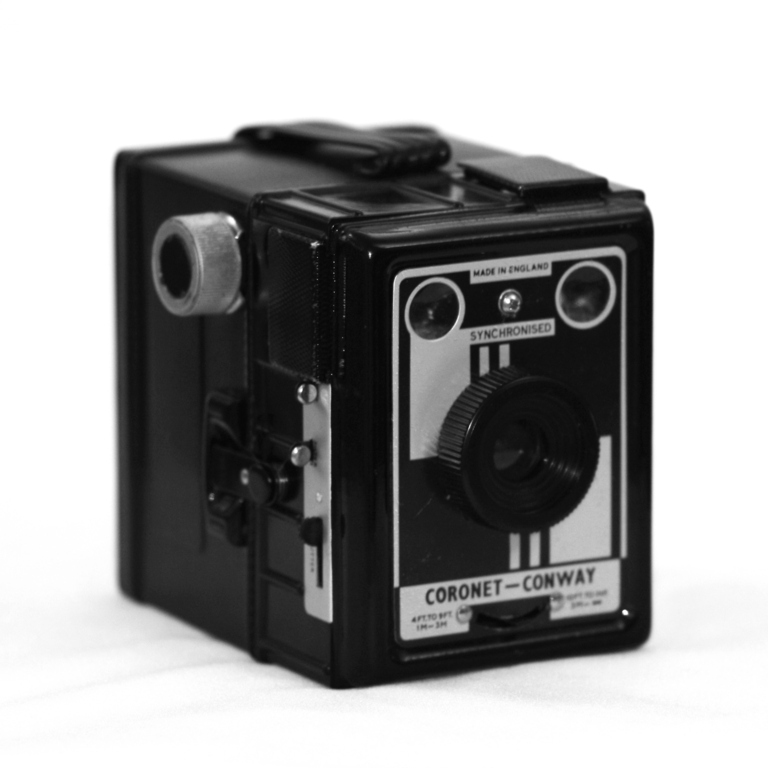
New camera: Coronet Conway Synchronised

For some time now I’ve been wanting to get into medium format photography. I have the right developing stuff to process the films myself, but unfortunately no way of scanning the negatives without buying a flat-bed scanner. But my colleague Paul offered to scan 120 roll film if I processed it first. With this barrier removed, I decided to give it a go.

Many of the readily-available 120-format cameras are so-called “toy cameras” such as the Holga and Diana. I wasn’t interested in modern(ish) toy cameras, and instead looked for anything old and inexpensive.

Eventually I bought a Coronet Conway Synchronised: a cheap 1950s box camera, made in Birmingham. I was drawn to it because it came in its original box with manual, paperwork, and a parabolic flashgun.

Coronet Conway Synchronised

It’s extremely crude, with a fixed aperture and fixed shutter speed at approximately 1/30s (or bulb mode). The lens is fixed-focus from 9 feet to infinity, with a small lever to snap it into “close up” mode – 4 to 9 feet.

What this means is there’s no metering or manual control of any sort. The only control I have over exposure is the choice of film speed. There’s no guidance in the user manual on which film speed to use, so I’ve gone with a fast film – some Ilford HP5+ 400.

I mentioned this camera came with a flashgun, the Coro Flash. It takes bayonet-type single-use flash bulbs like the PF3N. These are almost impossible to come by these days, but fortunately I found that the PF1 with an adapter will fit. PF1 bulbs are somewhat easier to find on eBay, so I’ve ordered a box of 15 and will try my hand at dangerous indoor photography 🙂

Conway Synchronised with Coro Flash

I shot a roll of any old rubbish, just to test the camera and see if the film was a good match. Turns out the exposure was almost spot-on every time, in a variety of lighting situations, so I’m very pleased. Unfortunately, in my confusion in loading the film I didn’t line up the right set of numbers with the little window on the back of the camera.

The camera is supposed to be wound on 9cm after each photo: by following the numbers, I was winding it on 6cm. The photos are all overlapping. But it has probably worked out for the best. I’ve ended up with a long, blended patchwork panorama of what was otherwise a set of garbage test shots.

Like I said, I don’t have any way of scanning these photos and I’m not about to ask Paul to waste his  time scanning the results of my partially failed experiment. I found a sort of workaround, by attaching the film to my computer screens, bringing up a white page, taking photos on my DSLR, and stitching them together with Hugin. The photos and the stitching are pretty bad, but you get the idea.

How to scan 120 roll film

You can click this preview for a bigger version. As far as I can make out, from left to right, you can see:

  • Two waterfalls in Brandon Hill park
  • Two shots of Cabot Tower, also in Brandon Hill park
  • My friend Nathan on a bench
  • Cabot Tower again
  • Nathan again
  • A leafy landscape
  • A shot over University Hall at Stoke Bishop (with the frames of my screens through it)
  • A long-shutter picture of a car driving past my balcony at night
  • My friends around my table
  • A car in the car park
  • Hana in the car park
  • Two views from my balcony – one portrait, and one landscape
A roll of 120 format film

As you can see, it’s a “disaster” in terms of producing good photos, but I rather like the effect of a mixture of memories from throughout the week. The frames of my monitors doesn’t help, but I might give this technique another go, using my TV screen 😀

More on infrared

A while ago I shot some pseudo-infrared film: Ilford SFX 200. Unfortunately, being the impatient 6 year old that I really am, I didn’t fully read the data sheet.

The film is only sensitive up to 740 nm on a good day, while my filter only allows through wavelengths greater than 720 nm. Therefore, the film was almost guaranteed to be blank as hardly any light would get through.

Armed with this knowledge, I bought two rolls of Maco 820c which, as its name suggests, is sensitive up to 820 nm.

I also read a bit about how to meter properly when using an infrared filter. I set the ISO to 12 (the lowest my AE-1 will go). I attempted most of the photos 2 or 3 times, sometimes using the camera’s TTL meter with the filter on, and sometimes metering without the filter, then adding the filter and adding anywhere between 4 and 8 stops of exposure. In most cases the TTL light meter seemed to suggest about +7 stops, so I figured I was doing it about right.

I developed the film a couple of nights ago, and was disappointed to find it totally blank except for the one frame I’d shot without the filter. I hung it up to dry anyway, but then noticed that some ghostly images were appearing! I guess this means that I didn’t fix the film properly. Nonetheless, about half a dozen of the frames are showing underexposed images – which is progress. After about ten minutes the images stopped darkening so I moved them to a dimly-lit room to dry. I scanned them as quickly as possible, in case they disappeared again.

The negatives are massively underexposed, but the scanner was able to help a bit and I also used GIMP to boost the contrast massively. They look pretty awful and the grain is very coarse, but you can make out what the pictures are supposed to be if you look carefully. You can also see that much of the foliage is white, so I guess it worked 🙂

Some of the pictures also have fingerprints or creases, where the film got jammed while I loaded it onto my developing reel. It buckled and pinged out, and I had to poke it back in.

Here are some samples (published on this, my geek blog, rather than my photo blog, since I reserve the photo blog for pictures I actually like; and I consider these photos very much a scientific experiment!)

The Institute for Advanced Studies
Royal Fort House
Centenary Sculpture, Royal Fort Garden
Nathan in Royal Fort Garden

Incidentally, it’s now been a couple of days since I developed the film, and the images are showing no signs of fading further. Goodness knows what caused the magic appearing effect, then.

I still have one roll of Maco 820c remaining. Next time I will increase exposure by many, many stops. 15, perhaps. The camera’s longest shutter speed is 2″ so this will almost certainly put me in the region of bulb exposures and stopwatches.

If this doesn’t yield decent results I’ll stop buying infrared film, because it’s not cheap!

An afternoon on the beach

Today, Hana and I went to Weston-Super-Mare. I’ve been craving a proper photo session all week, but livened by the thought of the beach, I couldn’t decide which camera to take. So I took three.

The photos on this page are from my (digital) Canon EOS 450D, because I haven’t yet used up and processed the film from the two proper cameras I also took.

The tide was out a long way, so I was able to walk quite far away from the sea wall, enabling me to get this wide panorama. It’s composed of 22 separate shots for a total of 154 megapixels, and 51 minutes of my computer’s time stitching it all together. This thumbnail is too thin to see anything, but you can click for a somewhat larger version.

Weston-Super-Mare

I’ve been hunting for a decent panoramic scene for a while now, since I snapped up a panoramic frame a few weeks ago and have been wanting to fill it. This picture has an aspect ratio of 21:1, while my frame offers a mere 4:1, so I’ll have to keep hunting for something not quite as wide as an entire seafront.

I reckon the best of my photos today were captured with my Canon AE-1 with infrared film, and my Braun Paxette with regular black & white film. However, just to keep you going for now, here’s a few more taken with the 450D.

Hana’s black & white stripes really make this picture for me.

And here’s me, shooting something with my Paxette.

Calibrating the focus ring on a Paxette

Recently I was given a Braun Paxette. After running a couple of rolls of film through it, I’ve decided that the focus isn’t quite calibrated correctly according to the focus ring.

Fortunately, you can loosen three grub screws around the snout of the lens and rotate the focus ring without moving the lens, line it up properly, and tighten it up again.

To calibrate the focus, you will need:

  • a bright and high-contrast object a known distance from the camera
  • some tracing paper or other diffuse translucent material

And here’s how we do it.

  1. Set up the camera on a tripod with the back open/removed. Attach the tracing paper where the film would usually go, like so:

    Calibrating a Paxette
  2. Put your bright object a known distance from the camera, and measure it. Call this distance X. If working indoors, try using something like a desk lamp or a TV screen (both are bright, with strong edges). If working outdoors, you could use a building with strong features (and pace out the distance from your camera).
  3. You might need to cast a shadow over the paper to see your image, but it should be there, albeit upside down.
  4. Focus the image so it is sharp. It can be hard to tell if the image is sharp, so you could use a magnifying glass to inspect it.
  5. When you’re happy that the image is in focus, you know that whatever your focus is set to now is X. Loosen the focus ring, readjust to that value, and tighten.

You’re done! Happy shooting.

Wrong way

Yesterday Hana and I drove to Blagdon Lake for a walk and a picnic. It seems the sat nav had a bonkers moment and insisted we should go down this road:

No matter where we went after this, it insisted on trying to send us back, so we turned it off. We didn’t have a map, but eventually we somehow managed to find our way to the lake.

Just in time for the rain to begin.

It was grey and horrible with no real opportunities for photos, so we ate our picnic in the car and went home.

Some macros

As I wrote recently on my blog, I bought a Tamron 90mm macro lens. Up until today, I’d only published a boring photo of a piece of Velcro. But over the last few days I’ve taken a few photos with it, and here are the results.

This is a screw. Bonus points to anyone who can correctly guess which type!

This is a piece of 35mm film. It’s black because it’s the exposed film leader that I snipped off when developing a film the other day.

A close-up of the aperture ring of the beautiful, scary and fun camera that is the Braun Paxette Electromatic II.

And finally, here are some flowers that I saw in Royal Fort Garden. No idea what they are. Anyone?

Sunny 16

Since using my Braun Paxette, I’ve had to learn about the Sunny 16 rule to get the exposure right. The details on this page are shamelessly stolen from Wikipedia.

The rule is simple.

  • Set your shutter speed to the inverse of your film speed.
ISO Shutter
100 1/100 (or 1/125)
200 1/200 (or 1/250)
400 1/400 (or 1/500)
  • Pick your aperture according to these conditions.
Aperture Lighting Conditions Shadow Detail
f/22 Snow/Sand Dark with sharp edges
f/16 Sunny Distinct
f/11 Slight Overcast Soft around edges
f/8 Overcast Barely visible
f/5.6 Heavy Overcast No shadows
f/4 Open Shade/Sunset No shadows

I’ve shot a couple of rolls of film in the Paxette now, with good success when it comes to exposure. Unfortunately the Paxette has a fixed shutter speed of 1/40 so it’s more a case of choosing the ISO to match the shutter. Fortunately Ilford produce a film with ISO50.

For a laugh, I also spent a day practising with my DSLR in full manual, exposing with the Sunny 16 rule. It worked!

I think all photographers should be aware of it, because it’s extremely useful. Give it a go!