Heart rate monitor

Recently I went on a Baltic cruise for a fortnight with my family. The ship boasted a fully-equipped gym so I decided to have a go.

I cycle almost daily, for commuting and for exercise so I have no concerns about my general fitness. But I thought I may as well have a go at something other than cycling while I had the opportunity.

I spent quite a lot of time on the treadmills. I used to run a lot at sixth form but hardly at all since I left in 2004. I found it came back to me quite naturally, and was delighted to find that these treadmills have built-in heart rate monitors. I could run fairly hard for 20+ minutes and keep my heart rate within 160-165 bpm. I don’t know if this is good/normal/etc but I don’t care. I just like statistics! 😛

When I got home, I was curious about how my heart performs when cycling, so I went to Tesco and bought their cheapest heart rate monitor. It doesn’t have that many features, but I don’t want any features except to know my current heart rate. Annoyingly, it beeps once per heartbeat and you can’t turn this off, but never mind.

Yesterday I cycled the 6 miles to work on my racing bike with the heart monitor rigged up. The first 3-4 miles are on the Bristol-Bath cycle path which is almost completely flat, and I cruised at a speed of around 22mph with a pulse of around 160bpm. So far so good.

Next my route takes me through Old Market and eventually Broadmead. Here it’s a bit hillier, and I have to deal with traffic and traffic lights, which means I keep accelerating and braking. My heart got up to 175bpm with the extra exertion.

Finally I have to get up St Michael’s Hill, and ascending this climb, working hard out of the saddle, I peaked at 197bpm.

According to Diet and and Fitness Resources, the maximum heart rate (MHR) for my age and gender should be 197bpm and recommended heart rates for different types of exercise are in the following table.

Type of exercise % of MHR Heart rate
Recovery/Weight Loss 60 – 70% 118 – 138
Aerobic 70 – 80% 138 – 158
Anaerobic 80 – 90% 158 – 177
Maximum 90 – 100% 177 – 197

Of course these type of statistics vary hugely from person to person, but I guess it means I do a lot of exercise broadly in the anaerobic range.

Baltic cruise: Stockholm

Another day on our cruise finds us on our way into the Swedish port of Stockholm.

The day immediately got off to a fascinating start, as Stockholm is surrounded by an archipelago of tiny islands. Great fun if you have a motorboat to whizz round the sharp corners, but for a 90,000 tonne ship there are only two or three passable routes and the ship has to slow right down to only a few knots.

You can see the archipelago in the mini map below, plus the shipping routes in dotted lines – or you can see for yourself on Google Maps. We approached from Copenhagen in the South-West, circled the archipelago and ultimately homed in on Stockholm from the North-East, along the path of the shipping routes.

A map of Stockholm

I woke up early specifically to stand on deck and watch the ship carefully navigate its winding way through the archipelago. It was a little misty but absolutely beautiful, and I hope some of these photos have captured but a pinch of that beauty.

Stockholm archipelago
Stockholm

The city itself is spread across several islands, which are connected by a few bridges. It would be a long walk to visit all of the interesting islands, so we bought a day pass for the bus boats that are constantly whizzing around between the islands. This gave a unique view of the city, too.

Here we are standing by the water on Djurgården, an island which is home to an amusement park, several museums and lots of open land.

The family on Djurgarden

Later on, in Gamla stan (the old city) we witnessed the changing of the guard. It’s a grand ceremony with soldiers in full costume on horseback, accompanied by a mounted brass band.

The changing of the guard in Stockholm

We also visited Storkyrkan, the oldest church in Gamla stan. It was built in red brick rather than stone, and had all the usual features you would expect in a large church. It was also fairly dim inside so there wasn’t much scope for good photos, but this unusual stained glass window did catch my eye.

A stained glass window in Storkyrkan

It so happened that Stockholm Gay Pride festival was taking place on that day, too. We watched the parade pass – it was absolutely huge and there was a seemingly unending procession of floats, singers, dancers and actors. I took a few photos over the heads of the crowd.

Stockholm Gay Pride
Stockholm Gay Pride
Stockholm Gay Pride

Sailing out of Stockholm in the late afternoon, I saw a dockyard where the cranes were painted like giraffes. Cute.

A giraffe crane

We were also treated to our first decent sea sunset of the cruise. It was hard to capture such a breathtaking sight on a camera, but here’s my best attempt.

A sunset at sea

To be continued…

Monitoring AQL SMS credit with Nagios

Further to yesterday’s post about setting up SMS alerts from Nagios, I decided I wanted to monitor how many SMS credits I have left in my account.

AQL provide a way of finding out via an HTTP request, so I set about writing a perl module to check and return the result to Nagios.

N.B. I’ve now published this module on Monitoring Exchange. Please download the plugin from there, as I will keep that copy up to date if there are changes in the future (and the copy on this page is likely to go out of date).

check_aql_balance

#! /usr/bin/perl -w
# Usage: check_aql_balance [username] [password] [warning] [critical]
# Example: check_raid fred bloggs 100 50
#         WARNING Balance 23 credits

use strict;
use LWP::Simple;
use lib "/usr/local/nagios/libexec";
use utils qw(%ERRORS);

my $username = $ARGV[0];
my $password = $ARGV[1];
my $warningval;
my $criticalval;
$warningval = $ARGV[2] or $warningval = 20;
$criticalval = $ARGV[3] or $criticalval = 10;
$warningval =~ s/[^0-9]//gi;
$criticalval =~ s/[^0-9]//gi;

if (!defined $username || !defined $password) {
    print "UNKNOWN, Unable to retrieve account balancen";
    exit $ERRORS{'UNKNOWN'};
}

my $url = "http://gw1.aql.com/sms/postmsg.php?username=$username&password=$password&cmd=credit";
my $content = get $url;

if (!defined $content) {
    print "UNKNOWN, Unable to retrieve account balancen";
    exit $ERRORS{'UNKNOWN'};
} elsif ($content =~ m/AUTHERROR/i) {
    print "UNKNOWN, Unable to retrieve account balancen";
    exit $ERRORS{'UNKNOWN'};
}

$content =~ s/[^0-9]//gi;
if ($content >=0) {
    if ($content < $criticalval) {
        # critical
        print "CRITICAL, Balance $content creditsn";
        exit $ERRORS{'CRITICAL'};
    } elsif ($content < $warningval) {
        # warning
        print "WARNING, Balance $content creditsn";
        exit $ERRORS{'WARNING'};
    } else {
        # ok
        print "OK, Balance $content creditsn";
        exit $ERRORS{'OK'};
    }
} else {
    # invalid number
    print "UNKNOWN ,Unable to retrieve account balancen";
    exit $ERRORS{'UNKNOWN'};
}

The only required arguments are the AQL username and password, but you can optionally specify the limits that trigger Warning or Critical status. If you omit these, the script defaults to values of 20 and 10.

In your commands.cfg, add a block like this to define the command. Again, you can omit the last 2 parameters if you are happy with the defaults..

define command{
    command_name    check_aql_balance
    command_line    $USER1$/check_aql_balance $ARG1$ $ARG2$ $ARG3$ $ARG4$
}

And finally, in the localhost.cfg (or any other config file for hosts/services) you can add the service like this.

define service{
    use                             local-service
    host_name                       localhost
    service_description             AQL account balance
    check_command                   check_aql_balance!fred!bloggs!20!10
    notifications_enabled           1
}

Simples!

SMS alerts with Nagios

In a previous post I mentioned how easy it is to increase functionality in Nagios.

Today I was asked to set up SMS alerts in Nagios, as well as the existing email alerts. I am by no means the first person to write about this, but this post is intended to be a start-to-finish guide, covering all aspects.

Choosing a provider

The first step is choosing a provider which has a decent API for sending SMS messages. I chose AQL, as I have used them in the past. They allow you to send SMS messages via a web interface, HTTP GET, HTTP POST, or email.

In that way, perhaps the easiest way to get SMS alerts is to get Nagios to email its alerts to the AQL SMS gateway. But I wanted to do it “properly”.

So I signed up for an account with AQL and bought a small number of SMS credits for the account. It’s also possible to have a contract for heavy usage, but I can always upgrade to that if I need to.

Defining a new method of alerting in Nagios

In the file /usr/local/nagios/etc/objects/commands.cfg there is a section where notification commands are defined. I added a couple more definitions for SMS alerts for hosts and services. My SMS script would have a calling syntax like /path/to/script phone_number message.

So I added a couple of definitions like this, obviously using a real mobile phone number:

define command{
command_name alert-service-by-sms
command_line /usr/local/nagios/libexec/alert-by-sms 01234567890 "Nagios Service $NOTIFICATIONTYPE$ Alert: $HOSTALIAS$/$SERVICEDESC$ is $SERVICESTATE$"
}

define command{
command_name alert-host-by-sms
command_line /usr/local/nagios/libexec/alert-by-sms 01234567890 "Nagios Host $NOTIFICATIONTYPE$ Alert: $HOSTALIAS$ is $HOSTSTATE$"
}

The script

Now all remains is to write the script that will do the legwork. If you decide to go with AQL as your provider, you need to install their Perl module from CPAN. Use a command like this:

cpan SMS::AQL

And then make a Perl script like this. You can save it anywhere you like; I chose to put it with the other Nagios executables in /usr/local/nagios/libexec just to keep it with the rest. Adjust the username and password to match your AQL credentials, and set the sender parameter to be either a UK mobile number (so the recipient can reply to the message) or simply a text string which appears as a name to the recipient, and does not allow them to reply.

#!/usr/bin/perl -wT

use strict;
use SMS::AQL;

my $to = $ARGV[0];
my $msg = $ARGV[1];
$to =~ s/[^0-9]//gi;

my $sms = new SMS::AQL({
username => 'fred',
password => 'bloggs',
options => {
sender => 'Nagios',
},
});

my ($ok, $error) = $sms->send_sms($to, $msg);
if (!$ok) {
print "Failed to send the message, error: $errorn";
} else {
print "Success!n";
}

It is, of course, wise to test that your script works by calling it from the command line. Once you’re happy it works, it’s time to tell Nagios to start sending alerts.

Enabling SMS alerts

This time, we need to edit /usr/local/nagios/etc/objects/contacts.cfg. Modify your contact entry to add the lines in bold. This assumes you have only one user with a mobile phone – remember their mobile number is hard-coded into the command definition!

If you have more than one user and you set alert-service-by-sms or alert-host-by-sms for both, you will get two text messages sent to the same phone number for each Nagios alert. As I only have one user it’s not a problem for me, but in the future I will probably post a more elegant solution where each user can get an individual text message.

define contact{
contact_name                    jonathan
use                             generic-contact
alias                           Jonathan
email                           alerts@example.com
service_notification_commands   alert-service-by-sms
host_notification_commands      alert-host-by-sms

}

And that should be everything! Now you have to test it, either by breaking a host or service, or setting up a bogus one that will definitely fail.

On Nagios

The things I’m about to say will almost certainly be common knowledge to anyone who has used Nagios before, but I’ll say them anyway.

In short, Nagios is a network/server monitoring tool. It’s web based and can monitor almost any network device. It comes with dozens of modules included, to monitor things with something as simple as a ping, to more complicated tests such as executing MySQL queries.

A friend of mine runs a web design and hosting business, and I look after his Linux boxes and some aspects of his network infrastructure in the data centre. He asked me to look into a monitoring tool for his various devices, which include Windows servers, Linux servers, managed switches, routers and firewalls, a couple of NAS boxes and some data centre kit such as an IP KVM and PDU.

I had heard of Nagios before but never used it, so I thought I’d give it a go. I was delighted at how easy it was to compile and install on CentOS, and to get a handful of basic tests set up on localhost. A small amount of fiddling later, I had the majority of the “advanced” tests set up, such as monitoring of HTTP, FTP, MySQL and other services on the Windows boxes. A slightly larger amount of fiddling later and I was interrogating several of the infrastructure devices for SNMP.

I was also very pleased at how modular and extendible the system is. Each test is simply defined in a config file, and an appropriate executable for the test is provided. By “executable” I mean anything that can be called by Nagios, and provides a return code for yay or nay. Many of the included executables were binary files, but I found many free downloadable modules online, many written in Perl. I have written some of my own in bash and Perl.

I’ve also downloaded other extensions, such as the ability to have an RSS feed of status alerts.

If any of the Nagios developers read this, well done, and keep up the good work. This is the ideal tool – quick to set up, yet with endless possibility for expansion once you have a little familiarity.
Baltic cruise: Copenhagen

Our first port of call was Copenhagen, the capital of Denmark.

Unfortunately the weather on the day wasn’t great (grey and rained on and off) but being British we put our brave faces on and walked around in the rain.

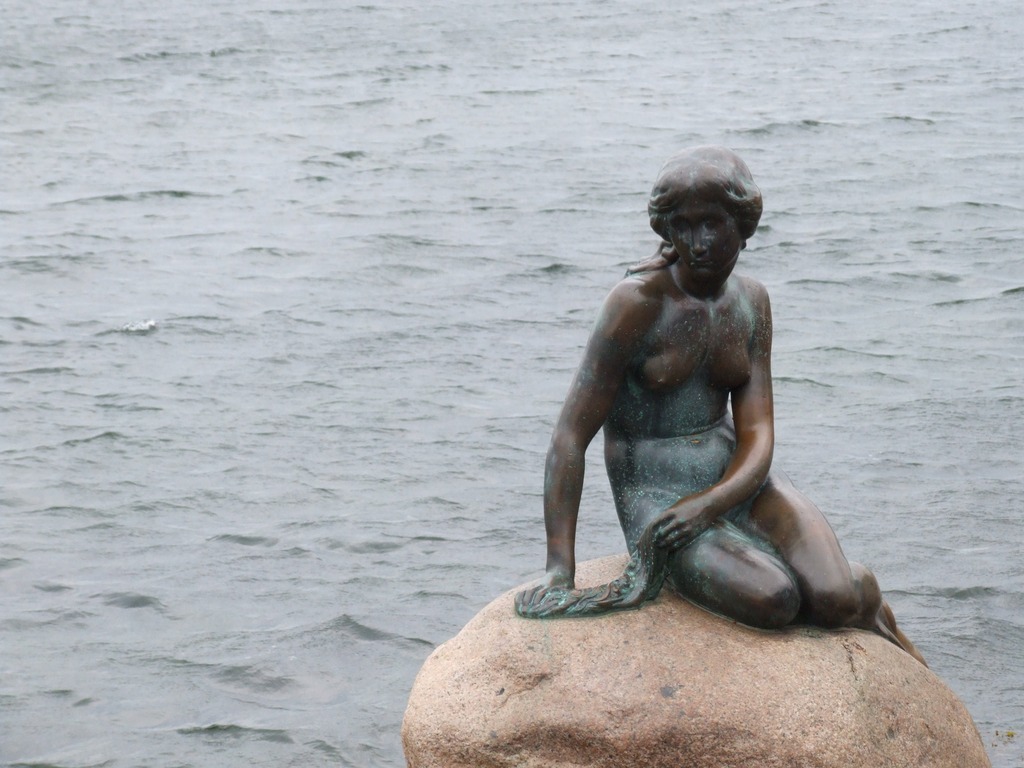
The walk from the dock to the centre of the town took us past the statue of the Little Mermaid, supposedly the most iconic sight in the city. I hadn’t actually heard of the statue before, but it was fairly unimpressive.

The Little Mermaid

Getting into town a bit, we saw this advert. Sounds like the title of a cheap porno, but the translation from Danish actually means final sprint.

Slut Spurt

A few paces further on, we arrived at Nyhavn (translation: New Port), a 17th century waterfront which is now dominated by cafés and bars. The sun came out, so we took a boat trip with a tour guide, and I took quite a few photos.

Firstly of Nyhavn itself:

Nyhavn
Nyhavn

Then our boat ventured out a little, and we passed the new opera house.

Operaen

Then the rain really started pelting. Fortunately our boat had a sliding perspex roof, but the passengers of the Sommerfuglen weren’t so fortunate.

Sommerfuglen

We passed lots of other grand buildings but unfortunately with the rain lashing down and the perspex roof closed, there was no point in taking pictures. Coming back into the Nyhavn again a little later, I saw another Danish sign that immediately appealed to my immaturity.

Max 4 Knob

We passed a moored boat on which there was a handful of bhangra drummers and dancers. A small crowd had gathered but I couldn’t see anyone throwing their Kroner into hats.

Bhangra dancers

To be continued…

Darwin Award

This evening, on my way home from work, I was knocked off my bike by a careless pedestrian. Again.

A family of 5 or 6 people walked out into the road without looking. I hit the brakes immediately and shouted to get their attention – cycling around Bristol this is practically an everyday occurrence for me, and the pedestrian almost always looks up and stops dead in their tracks – allowing me to pass them safely.

But on this occasion none of the group looked up, and they were spread across the road so there was no gap I could aim for.

Even though I was braking as hard as I could, my racing bike brakes aren’t really designed for stopping, and I ended up ploughing into the crowd of people. I shouldered a woman hard, which sent me veering off to the right, where I crashed up a steep kerb with both wheels. Having anticipated the crash, I managed to fall ‘nicely’ and avoided serious damage.

I immediately got back on the bike and rode away. The front wheel was a little buckled but ridable. After a bit I looked back over my shoulder and saw the woman lying in the road, crying. Perhaps a bit harsh of me not to stop, but I feel no guilt when the accident was entirely her fault. It’s what you get when you walk into the road without looking!

She was with her family who could look after her if necessary, and who might also have had a go at me for the accident (as is often the case with relatives).

Overall I’m just glad I didn’t end up with a dislocated shoulder, like I did last time. Not a pleasant experience.

As an aside, I was using my new heart rate monitor today. I didn’t check it immediately before the crash, but earlier on the same, flat stretch I had been doing about 130bpm. Immediately after the crash I was doing over 180bpm. That’s adrenaline for you!

Baltic cruise: Jewel of the Seas

I briefly mentioned in the last entry that we cruised on the Jewel of the Seas. Unfortunately, at the time of writing, the Wikipedia page is in dispute for being written like an advertisement. So I think some pictures would give a better impression of the ship.

The Centrum

At the centre of the ship, there is an atrium called the Centrum that extends the full height of eight decks. The first photo shows the view looking at up from the bottom; but perhaps more impressive is the view from the top, standing on the plate-glass floor! Absolutely terrifying.

A view up the centrum
A view down the Centrum

In dock

Here’s the Jewel (right), docked in Tallinn next to the MSC Ocean (left).

MSC Ocean and MS Jewel of the Seas

And another view of the Jewel, this time docked in Oslo.

The Jewel in Oslo

Not a great photo, but I wanted to include this photo of the horns. The largest horn has a diameter of probably six feet or more. All three horns sound simultaneously and interfere to make a deep growly noise which is unlike anything I’ve heard before.

The horns of the Jewel

Refuelling

In St Petersburg, we took on more fuel. It took about an hour to set up the tanker, 3-4 hours to pump the fuel, and another hour to pack up. The oil tanker was pretty big, but dwarfed by the Jewel.

The oil tanker alongside the Jewel

The crew extract some oil from the tanks using a small pot on a piece of string, and test it before it is pumped. I couldn’t tell what these tests might be, but it didn’t take long and the foreman jotted down some notes on a clipboard.

From what I could tell, the belly of the tanker contained twelve compartments, each with its own pump and hatch for testing. The crew sampled oil from all twelve hatches, and when pumping began I heard twelve pumps start working, one after another.

The crew test the oil

Some fat guy checks the counter to see how many litres have been pumped. Also visible is the black hose where the oil is pumped to the Jewel. A sign on the tanker said this hose had been tested to 10 Bar.

The fuel gauge

The oil tanker has what appears to be a jet-propelled lifeboat. It looks like it can go temporarily underwater, which makes sense when you look at the angle of its launch. I’m guessing it has to be pretty fast so the crew can bail if the tanker is in danger of catching fire.

The tanker’s lifeboat

To be continued…

Baltic cruise: Harwich

Yes,I know. Harwich isn’t the most exciting, picturesque or romantic destination. But it was the port of departure for the Baltic cruise, which I went on with my family (parents and two younger brothers).

I took lots of photos over the fortnight, and now on my photoblog I will upload the highlights of each destination, bit by bit.

Like I said, Day 1 involved driving from Nuneaton to Harwich (about 3 hours by car), boarding the ship – the beautiful Jewel of the Seas – and setting sail. I didn’t take many photos of note, but I did capture a nice shot of my brothers on deck, and one of the sunset as we sailed out into the North Sea, on our way to Copenhagen.

My brothers on deck
The view as we sail across the North Sea

To be continued…