Newbie’s guide for Linux Apache web servers

Today a friend (from a Windows background – still a friend?! :P) asked me how to go about setting up a LAMP (Linux, Apache, MySQL & PHP) server. I wrote him a few notes, not only on how to configure the LAMP stack, but also on how to configure a Linux system properly from scratch, and how to do so securely. There are millions of guides out there that explain how to serve web pages with Apache, but not many of them explain the basics of setting up a secure system too.

I’ve edited these notes slightly to make them suitable for a wider audience, but in essence it’s the same stuff. Hope it’s useful!

OS installation

I recommend using CentOS. It doesn’t really matter whether you choose 32-bit (i386) or 64-bit (x86_64) but use ideally use 64-bit unless there’s a reason not to.

Boot from the CD or DVD of your choice. It doesn’t matter whether you use the full DVD, or the network install CD.

Choose the text-based installer from the boot prompt by typing linux text. The text installer doesn’t install as much extra rubbish as the GUI installer.

In most cases the default options are good enough. One option you should change is to use an NTP time server. This is especially important with virtual machines, since they suffer badly from clock drift.

Choose a strong root password. You will only need it once again. After that, you won’t even even need it for logging on, so there is no need to pick anything memorable. In fact, you are best off choosing a long, random string of mixed-case letters and numbers.

When it comes to choosing packages, deselect as many of the groups as possible. We will add the packages we need individually later on.

Let the installer run its course, and reboot.

Users and passwords

Upon first boot, log in as root using the password you picked before. Now create new user accounts and set passwords:

useradd yourusername
passwd yourusername

Now for setting sudo access. This is like “run as admin” on Windows. Type visudo. In the text file that opens, read down to the line that says

root    ALL=(ALL)       ALL

Duplicate it twice by pressing yyp. Go into insert mode by pressing i and change the username root to your username. When you are done, hit Esc and type :wq to save and exit. Gotta love vi commands 😉

To disable remote root login via ssh, edit the file /etc/ssh/sshd_config using your favourite editor. If you don’t already have a favourite editor, use vi.

Find the line:

#PermitRootLogin yes

and uncomment it and change the value to no:

PermitRootLogin no

Restart the ssh daemon by doing

sudo /sbin/service sshd restart

From now on you can gain root access by using the sudo command, and you won’t need to log in as root again. Log out now by typing exit and re-login as your own user. Forget the root password forever.

Installing packages

First we add a couple of third-party software repositories that have useful stuff.

sudo rpm -Uvh http://download1.rpmfusion.org/free/el/updates/testing/5/i386/rpmfusion-free-release-5-0.1.noarch.rpm http://download1.rpmfusion.org/nonfree/el/updates/testing/5/i386/rpmfusion-nonfree-release-5-0.1.noarch.rpm

Let’s get rid of the stuff we don’t want or need. There are no doubt more than things that can be removed than I’ve listed here, but they can be removed later.

sudo yum remove bluez* pcsc*

Update the system so you’re sure that that latest versions of all software are installed.

sudo yum update

Now we can install the stuff we want for LAMP!

sudo yum install httpd mysql-server php php-mysql

If you are wanting to use any PHP modules/libraries they can be installed here too, such as the commonly-used graphics library gd.

Services

Let’s start the two daemons for Apache and MySQL, and tell them to start on boot.

sudo /sbin/service httpd start
sudo /sbin/service mysqld start
sudo /sbin/chkconfig httpd on
sudo /sbin/chkconfig mysqld on

Apache in its default state will run out of the box. MySQL just needs a root password setting.

mysqladmin -u root password NEWPASSWORD

From now on it’s advisable to GRANT access to specific users on specific databases/tables. Go read about MySQL users.

Firewall

Let’s assume you want HTTP on port 80 open to the world. Open /etc/sysconfig/iptables for editing, and add this line.

-A RH-INPUT -p tcp -m tcp --dport 80 -j ACCEPT

Save and close, and run this to make the changes live.

sudo /sbin/service iptables restart

Editing configs

The main config file for Apache is at /etc/httpd/conf/httpd.conf. It doesn’t need any changes for basic operation, but if you edit it you need to restart the httpd service to pick up the changes.

If you get serious with web publishing from a LAMP platform, you will probably want to read about name-based virtual hosts.

Adding content

In its basic configuration, you should add PHP scripts, HTML pages and other content like images and stylesheets to /var/www/html/. You do not need to restart the daemon for it to pick up new content.

When debugging pages, you will probably find it handy to refer to the error log, at /var/log/httpd/error_log.

Tip: Open two SSH windows to the server – one for editing stuff, and the other for watching the log scroll by as events occur. Use Ctrl-C to break out of it. Do this:

sudo tail -f /var/log/httpd/error_log

More Bristol architecture

This week I loaded some Ilford Pan F Plus 50 film into my AE-1. It’s the slowest film I’ve used to date.

I took a few photos around the campus of Bristol University but before I had a chance to shoot many, I lent the camera to my mate who visited for the weekend. He took pictures of steam trains, and we developed the film together. No doubt his pictures will be on his blog; I’ll provide a precise link to the actual post when he does. In the meantime, these are the handful of photos that I took.

The wall of the Chemistry department.

Colston’s Almshouses on St Michael’s Hill.

No 71, St Michael’s Hill

Royal Fort Gatehouse

My Tamron 90mm macro lens

I quite enjoy macro photography. When I used to use my Fuji S9600 as my main camera, it had a super macro mode, which allowed me to focus on objects as close as 1cm. That was pretty handy for macro shots and the results were generally good – such as this disgusting pupa.

Since swapping the S9600 for a Canon EOS 450D DSLR, I don’t have a macro facility. The best I could get was my Tamron 70-300mm telephoto zoom lens which allowed 1:2 magnification at full zoom. But the subject had to be at least 1.5m from the camera and image quality wasn’t great, so it wasn’t really a solution.

I bought a set of EF mount macro extension tubes from eBay. These sort of replicated the behaviour of the S9600, by allowing the camera to focus closer. By spacing the lens further from the camera body, it’s possible to focus down to just a few millimetres away from the end of the lens, so tiny objects can fill the frame.

However, as EF lenses are electronically controlled, you lose autofocus and the ability to shoot with the aperture anything other than wide open. Naturally, the depth of field is then very shallow. Sometimes it works, like in this photo of a pound coin, but it’s quite frustrating not being able to stop down.

The other disadvantage of “cheating” at macro by focusing closer is that it’s hard to get light onto your subject, because the snout of the lens casts a shadow. When I use my macro LED ring flash, some of the objects I photograph have to be so close to the end of the camera that they are within the ring flash and hence get no light.

So I decided the only real solution would be to buy a proper macro lens with 1:1 magnification. I considered the Canon 60mm macro as the cheapest entry-level macro lens, but unfortunately it’s EF-S mount and can’t be used on 35mm SLRs, such as my EOS 300. If I’m going to shell out for a lens, I want it to work on all my cameras.

The next lens up in Canon’s range is the 100mm macro, which is EF mount, but is unfortunately quite a bit more expensive. I watched a few second hand lenses on eBay but the auctions always closed for prices significantly higher than I was willing to pay – especially as macro photography is only an occasional treat for me.

The two main rivals of the Canon 100mm are the Tamron 90mm and the Sigma 105mm. The Sigmas are rarer but there were plenty of Tamrons on eBay. The first few auctions for the 90mm finished at quite high prices but eventually I found one ending at an awkward time and won the auction for a bargain price. The lens is second hand but very new; mint condition and boxed in all original packaging.

The main disadvantage of the Tamron compared against the Canon is that the Canon has an ultrasonic autofocus motor, and full-time-manual focussing. As nice as those things are, they weren’t worth an extra £150 to me. The Tamron lens flips between manual and autofocus by sliding the whole focus ring back and forth, which is much nicer than fumbling for a small switch on the side of the lens barrel.

The Tamron 90mm feels solid compared with some of my other lenses – most of them budget ones. It’s reassuringly heavy and feels like an expensive lens. The autofocus is quite slow and quite loud, but this doesn’t matter. When I’m composing a macro scene, I can take all the time I like.

The main gripe is that the lens barrel extends by about two inches when focussing. You have to be careful not to bump into your subject if you are working at close range.

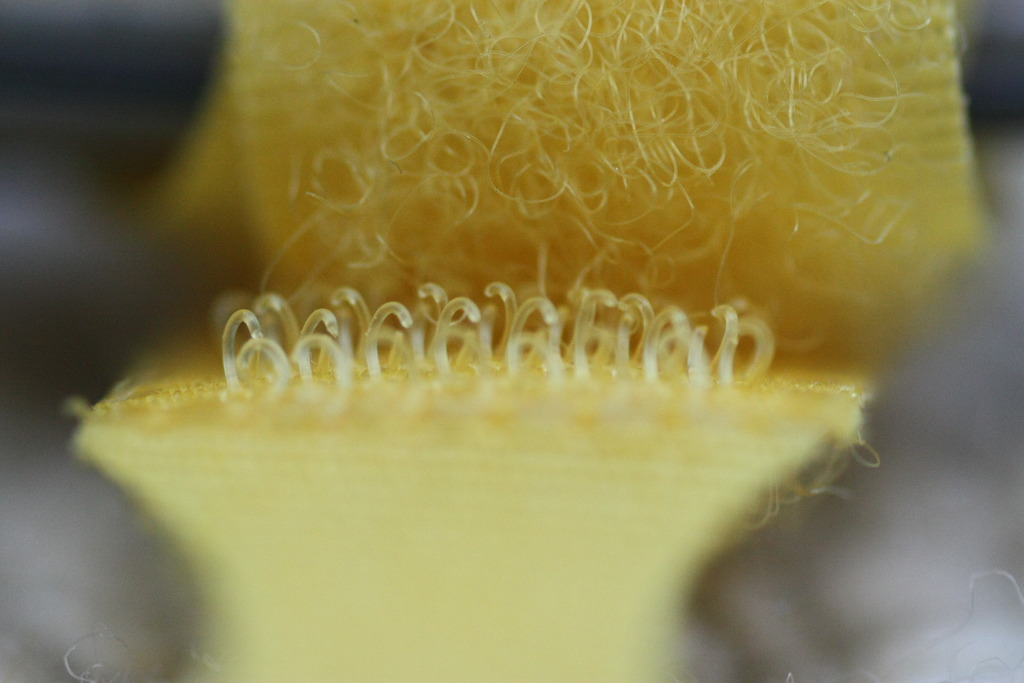
I’ve only owned the lens for a few hours, but I can see it’s a fantastic lens. The images are very sharp and almost completely free from any aberration. When I have some time to experiment with some small subjects, I’ll see what I can come up with. But for the time being, here’s a picture of a piece of Velcro.

Yay for Fedora 13

Fedora 13 (“Goddard”) was released today.

I wouldn’t normally go upgrading my OS to the latest on the day of release, but frankly anyone who runs Fedora is an early adopter by definition.

I started by upgrading two unimportant Fedora 12 virtual machines at work using preupgrade. One went smoothly but the other failed because the /boot partition was too full. I cleared out all old kernels and tried again, with success. Each upgrade took less than an hour, I think, but I wasn’t really paying attention.

After brief testing to make sure all the important stuff had upgraded properly, I upgraded my work desktop PC, my home PC and my laptop too. They were all on Fedora 12 and the upgrades went without a hitch. I’m very impressed.

Massive thanks and kudos are due to the Fedora team for working so hard to get this release out and for providing such an easy upgrade path. I look forward to getting stuck into the new features of this release in time.

My next task is to upgrade my home server, which is currently running Fedora 11. Updates for Fedora (N-2) are only available for one month after the release of Fedora N, so time is now of the essence if I wish to keep my server secure. Unfortunately the reason I’m still on 11 is because the upgrade to 12 failed and I wasn’t able to get it working. I will probably take this opportunity to do a complete wipe and reinstall (scary!). Then I can also migrate from i386 architecture to x86_64.

Watch this space!

A sunny weekend

I visited my parents this weekend. Both of my brothers were also at home, because their birthdays are both in May.

We were treated to beautiful, sunny weather on Friday. My brothers played hockey in the garden but I was too lazy to join in, so I broke out my telephoto lens and tried my hand at some “sports” photography in the bright sun.

You might have noticed that “sports” was in inverted commas. This is why.

We stayed in the garden until it was dark. There was a slight coolness in the air, but nothing that wasn’t fixed by a hot chocolate!

Later on, the moon was bright and clear.

For Edmund‘s birthday, I gave him a Canon SLR. “Wow!”, you think, “he’s so generous!”. But you can forget about megapixels, gigadoodles and kilowotsits. In actual fact, it was an EOS 500N – a 1996 35mm SLR. He was pleased with it, so on Saturday we loaded up with film and went for a photowalk around Ensor’s Pool, a local wildlife reserve (err.. abandoned quarry). It’s quite scenic, despite being among a load of industrial units.

And here’s the man of the occasion, playing with his new toy.

I also took a photo that I’m likely to enter into this week’s Photo Challenge. The theme is Time, and I think this photo has a double meaning. It’s a moment frozen in time, but it’s also a dandelion clock.

Fair weather cyclists

As much as I like fair weather, I’m not nearly so keen on fair weather cyclists.

Fair weather cyclists are those who suddenly take to two wheels only when the sun is out. Typically I find them to be poor cyclists, both in their control of the bicycle (e.g. going in a straight line) and their road sense and observation skills.

At all times of year, a city commute is perilous, but never more so than during the Summer months. In the warmer season, my journey to work is continually hampered by other cyclists who cycle too slowly, ride on the wrong side, ride inconsiderately or unobservantly, stop and start without warning, hop on and off kerbs without looking and make many of the other mistakes that would be obvious to any semi-experienced urban cyclist.

I’ve had quite a few near misses and close encounters with foolish cyclists so far this year.

I can’t see testing and licences ever being issued for cyclists so not much can be done about it except hope they meet a sticky end with another major category of unsafe road user – a taxi driver.

Graffiti

I’ve never really attempted to take photos of graffiti before, this week I saw two pieces in particular that I really like – and a third whose photo also came out OK.

I spotted all three of these in the Clifton area of Bristol. This first one isn’t that interesting, but I like the contrasty black & white look.

Here someone has painted a picture of a mains plug onto a piece of street furniture.

And this last one is a picture of Derren Brown, along with a playing card. His face was about five or six feet tall, and was just one part of a larger piece of art. There were two other faces that I didn’t recognise, but it was obvious that they are also magicians.