
These yellow roses were in a vase in my parents’ living room. The room wasn’t dark at all – the sun was streaming in the window but the roses were brighter than their background.

These yellow roses were in a vase in my parents’ living room. The room wasn’t dark at all – the sun was streaming in the window but the roses were brighter than their background.
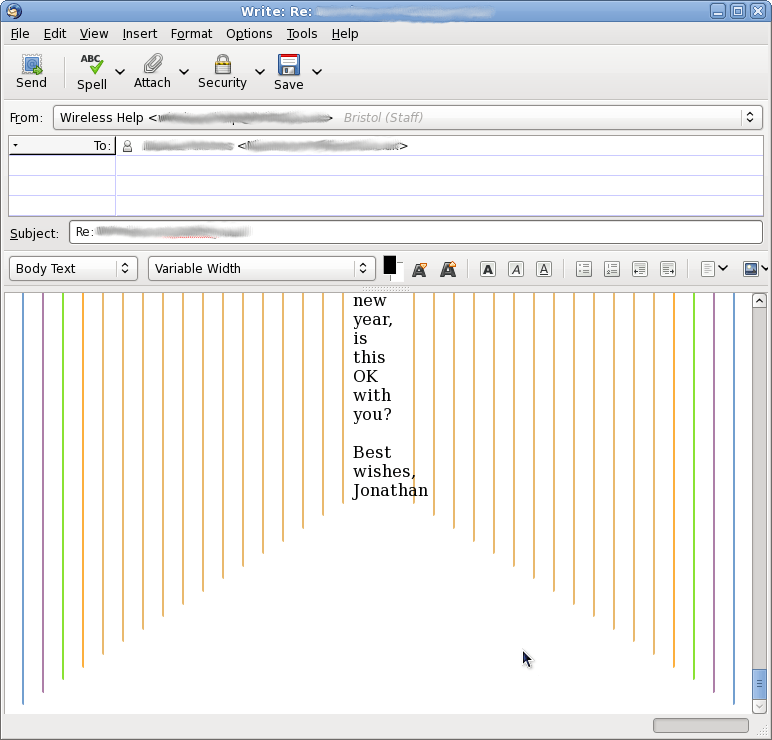
This is a rather old email thread (as you can see from the fact I mentioned “in the new year”, i.e. looking forwards to 2009. I consider it good practice to retain the relevant parts of the history when replying, but this conversation has gone on for so long that the formatting is getting a bit silly…

As someone who frequently makes online purchases, I am a frequent user of courier services. But on this occasion, the seller that I bought from used a courier that I haven’t experienced before – Interlink Express. And I have to say, they’ve done everything right. I am impressed by their level of service, and I think other couriers should follow suit. It’s not exactly rocket science – it’s taking care of the little things.
Firstly, they sent me an email the day before my parcel was due to arrive. This is really handy, as it gives me time to make arrangements to be at home – rather than the usual scenario where it turns up without warning and oh – I’m at work. Commence long drive at inconvenient time to wherever their depot is.
They also sent me an email on the day to let me know the parcel was on the van.
I was also impressed by their online order tracking. It seems to me that most couriers who offer this service have very vague entries such as “Dispatched” and nobody is quite sure what this means. They also never seem to update their status. City Link are pretty bad at this – once I received a parcel from them and for days afterwards it still claimed it was on the van.
Interlink Express provide detailed information on their tracking page and seems to be updated promptly. Of course there’s no excuse for it not to be, in the age of barcodes, databases and PDAs. But it makes a nice change nonetheless.
Here’s what their tracking page says about my order:
| Date | Time | Location | Event Status |
| 06 Nov 2009 | 13:24 | Bristol | Delivered, signed for by GAZELYS, using Saturn |
| 06 Nov 2009 | 08:22 | Bristol | Delivery note printed |
| 06 Nov 2009 | 08:21 | Bristol | On vehicle for delivery Out For Delivery e-mail response notification sent |
| 06 Nov 2009 | 05:31 | Bristol | Confirmed at depot |
| 05 Nov 2009 | 21:47 | Hub 1 | Forwarded to Bristol depot |
| 05 Nov 2009 | 21:40 | Hub 1 | Confirmed at Hub |
| 05 Nov 2009 | 21:37 | Hub 1 | Confirmed at Hub |
| 05 Nov 2009 | 16:17 | Alton | Customer data received Consignment Shipped e-mail notification sent |
| 05 Nov 2009 | 16:15 | Alton | Collected from self-labeller |
When it arrived, I was asked to sign on a touchscreen PDA, and was delighted to find that within a couple of minutes the tracking information had been updated. This is how it’s supposed to work 🙂
I recently (mid October) moved my home server into my loft, as its constant noise under my desk was getting on my nerves.
However I found that with a large area of roof exposed to the sun (even the weak Autumn sun), and practically no ventilation the ambient temperature fluctuates enormously.
In October when it was a little warmer and a little sunnier, the temperature would drop almost as low at 10°C and almost as high as 30°C. An ambient temperature of over 25°C seems to drive my disk temperatures up to over 50°C. This constantly changing temperature with high and low extremes is a sure-fire way to break hard disks.
After Week 42, I opened the loft trapdoor, which went a long way to keeping the temperature more constant. Unfortunately it also makes the flat rather cold.
Now it’s much colder outdoors, I’ve closed the trapdoor again and the loft temperature seems pleasantly cool and reasonably constant. Today the temperature up there is a steady 13°C, although the sun hardly shone. That’s cooler than your average air-conditioned data centre – and all free thanks to the crappy British weather 🙂
Oh, and the 6 disks are now all between 25°C and 30°C.

Well, maybe I bent the rules of Stu’s challenge a little this week.
Backgrounds are important to a photograph. Why not find a good background first, then wait for something to happen in front of it.
My background is the boring night-time view from my balcony, but as it’s the 5th of November, naturally there are fireworks going off all over the place.
I was originally watching a fairly distant bonfire party, and so the camera was aligned on its tripod and quite far zoomed in. Without warning, a much nearer firework shot up from a garden only two down opposite my balcony – and it was all I could do to hit the shutter.
This is the rather abstract result, and I quite like it. I love the detail of the “side sparks” shooting away from the main beam. Click for a bigger version and you can see better 🙂

I was musing today about the lifetime of my data, and what might happen to it after I die. I’m a jolly character, aren’t I?
But there are two questions here. First there’s the question of my private data – e.g. online banking stuff and other personal documents that I want to keep to myself for now, but may well have to be released to the executor of my will or whatever.
Then there’s the question of the data I’d love to share. For example my photographs and musical recordings – I’d like to think that they will persist long after I’ve gone. Maybe even wind up in a futuristic museum so people can marvel at how we used to live. Perhaps.
If I died tomorrow, would my family be able to get at my private files? It’s a bit more involved than looking in a box-file on top of my wardrobe. Nobody has an account on my home server and PC except me, and nobody else knows my root password (I hope).
But I don’t want to give anyone access to my data today. I don’t want to create accounts for other people that can access my stuff, and I don’t want to tell anyone my password. Can you imagine telling somebody all your passwords and saying they weren’t allowed to use them until your death?
That’s not to say that my data is totally inaccessible. My disks are not encrypted so booting from a live CD would be an easy way to read the data without having to log on as me. This would be an easy job for most of my geeky friends, but I don’t think my parents, brothers or girlfriend would be able to do it. Would my next-of-kin have the initiative to ask one of my colleagues or friends to “hack” my systems in the event of my untimely death?
I expect if the circumstances of my death were suspicious, police would confiscate my computers anyway and examine them. A police computer expert would have no problem in extracting the data, but whether or not they would hand it over to my family is a different question.
Of course for accounts I hold with third parties, such as online banking, email companies and of course my employers, it is usually possible to present a death certificate and the account will be opened for the executor.[1, 2] But this doesn’t apply to my systems.
The flip-side of allowing access to my data is that the executor or next-of-kin gets access to all of my data. After I die, I may well be happy for the executor of the will to browse my financial and legal documents, but what if I don’t want him or her to know about my plans to take over the world, or my illegal downloads? What if I have some embarrassing secrets that I don’t want my family to find out about?
The only two approaches here are to specify in my will which files should be deleted and which should be kept[3], or to encrypt everything that I do not wish to be read. Bear in mind that if you wish to make the encryption effective, you will also need to encrypt the backups.
Maybe the best idea would be to write down my password and some brief instructions for accessing my data if necessary, and then seal this in an envelope to be kept in a safe place with my will. Anything I don’t want seen, ever, can be encrypted. Then it should be straightforward for the relevant people to get access to my private documents, with minimal risk of abuse.
As I touched upon in the introduction, the second section is to do with the longevity of my created data. A large part of this is to do with choosing an appropriate format, and ensuring that the format stays current.
For example, my photos are currently stored on a hard disk, formatted with the ext4 filesystem, and saved as TIFF images. They are backed up, but that’s mainly irrelevant here. The point is that I don’t expect my hard disks to still be working in ten years’ time, and there’s a fair chance that today’s popular filesystems won’t be in widespread use after a decade either.
While I’m alive, it’s easy for me to move my things around. Let’s suppose next year hard disks start to become obsolete and a new type of memory card becomes commonplace. It will be easy for me to copy my photos from my hard disk onto this new memory card. I can also convert my images from their TIFF format to tomorrow’s shiny new format if necessary.
But who will do this after I’m dead?
It was easy for me. After my grandad died, I inherited a box of 35mm slides, as well as some 35mm negatives and some 6″×4″ prints. Things you can see with your eyes don’t tend to go obsolete in a decade. Provided I look after these physical photos and protect them from heat, light and moisture, they are likely to last for decades or centuries.
I’ve also scanned them in and archived them on disk – where they are safe from paper-curling humidity, but still prone to obsolescence as I mentioned above.
So long as I have backups and I keep with the times and convert my photos to whatever format is appropriate and save them on whatever media is current, I can’t see a problem. I could even make prints of all my photos and store them securely.
The snag comes when I die, and I will have to entrust my photos to a descendant. Hopefully they will treasure the photos and look after them, as I am doing with my late grandfather’s work – but there’s no guarantee. If I didn’t have an interest in photography myself, it’s entirely plausible that I might have declined my grandad’s slides.
It seems here that the best approach is to preserve my data while I’m still alive and kicking, and make it known to my family that I wish my photos to be looked after when I’m gone. Hopefully they will take heed!
Perhaps undermining the tone of this whole article, I might add that I’ll be dead so why should I care! 🙂
A while back I wrote about the worst cabinet ever.
Maybe this one isn’t as spectacular to behold, but there is a Cisco switch under all that spaghetti. There are also two PoE power injectors for wireless access points. All this is in a wooden cupboard and it was roasting hot.
You can see that they also haven’t bothered to install a patch board – instead there are just wall sockets covering the side, and a few lying around not attached to anything.
At the back, there’s a telephone patch panel too.

For those who have been following the issues around Samba suddenly breaking upon upgrade, I’ve now got to the bottom of it.
I’ve updated the original post with details, so if you wish to leave comments, please leave them on that post.
I stole the idea for this shot from Paul Seward, who in turn stole it from John Domingo.
With such clear instructions I thought “Meh, how hard can it be?”. I don’t think my result is anywhere near as good as Paul’s or John’s, which just proves it’s probably harder than I thought 🙂

Given that it was a brand new mirror, straight out of the cellophane, I’m disappointed by the refraction. Maybe I was too close to the mirror.
I found it pretty hard to align the flash. It would be easier with a modelling light so I could adjust the red gel and see where the red light would fall.
I was flicking through the user manual for my 1981 Canon AE-1 Program. Some of the pages are illustrated with sketches of two characters–a man and a woman–having discussions. In every case, the “stupid” woman is confused, has made a mistake, or doesn’t know what to do.
Her hero, a dashing young man, always comes up with the answer.

I don’t know about you, but I’m glad that today’s user manuals have simple labelled diagrams and bulleted lists of instructions.




 Jonathan Gazeley