Yes, I know it was published in 2000. You’d think that a cycling fan such as myself would have read it by now, but I never got round to it.
However, I can strongly recommend the book. As the title suggests, it’s not about about cycling (although cycling is mentioned a lot, naturally). This book is about beating cancer and it really is an inspirational piece.
It’s also particularly important to me as I inherited it recently from my grandfather – a massive cycling fan and keen cyclist who died from cancer last year.
Well I never! From an advert on Hotmail I was linked to a page which proclaims that MSN Messenger (more recently known as Windows Live Messenger) is 10 years old. I would have guessed it was older than that.
I can’t remember precisely when I first used MSN Messenger but I’m fairly sure it was in 1999. I don’t remember it being brand spanking new, though. All my friends were using it and I thought it had been around for a while.
I used to use the Messenger Plus addon to add features that the client neglected to include.
Of course, since switching fully to Linux I’ve used gAIM (now Pidgin), and I have to say it meets my needs perfectly, especially as I also have contacts on AIM now.
Who knows what developments we will see in online communication over the next decade. There’s lots of hype around videophones and that kind of thing, but the technology is already available and hardly used. I just don’t think it’s as practical.
In my opinion, IM‘s biggest rival is Facebook (among other social networks), which has completely changed the way friends, family and casual acquaintances keep in touch. It seems to have taken a slice out of personal email, and out of IM.
For a while now I’ve been using a service called last.fm. Basically it (a program called a scrobbler) monitors what music I listen to and compiles statistics. I only do it because I find statistics interesting, and often I surprise myself that I’ve listened to lots of an artist that I never really considered one of my favourites, for example.
last.fm can also recommend other music you might like, based on your taste which it works out from what you’ve listened to recently. I don’t bother with this because I don’t like being told what to do 😛
last.fm is free to join and the scrobbler will run on many platforms. I currently scrobble on:
Rhythmbox running on Fedora at home
Windows Media Center running on Vista at home
iTunes on Mac OS X at work
Of course, as with every similar site, there is a widget you can embed into your website, Facebook page, etc, etc. So here’s mine.
If you’re really interested in seeing more of my musical history, my Music Profile has many more views. You can even compare your musical tastes to mine!
No, really. I’m not interested in comparing tastes or building a network of friends, and I don’t expect you to find my history interesting. I just scrobble because I find my personal results interesting. Give it a go; you might too.
I recently bought (and blogged about) an O2 mobile broadband USB stick.
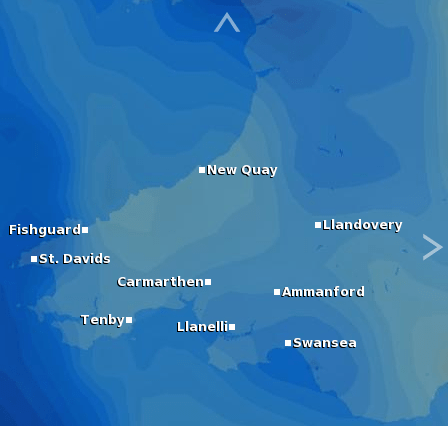
As I was on a camping holiday in a remote part of Pembrokeshire last week, I decided to take my Eee and the USB modem, just to see how it would work. I was aware that there would be no HSDPA coverage, since I had checked the coverage map before I left.
UK cellular network coverage
2G
3G
HSDPA
Three give the following summary of the different connection types:
2G network: gives you voice, text and picture messaging services
3G network: gives you all of the above, plus video calling and the internet on your mobile
HSDPA network (Mobile Broadband): gives you all 2G and 3G services, plus high-speed internet access on your mobile and with your dongle (USB modem)
When I connected to the network in rural Pembrokeshire, I was not surprised to find that I only got a 2G connection. The dongle’s LED was green, and according to Huawei:
Green – a GPRS data service is established
Dark Blue – a UMTS data service is established
Light Blue – a HSDPA data service is established
But what surprised me most was the latency in the connection. Pinging www.google.com gave responses between 4 seconds and 35 seconds! This of course makes web browsing totally unusable.
So my advice to anyone who is thinking of getting a USB 3G modem is to make sure your target areas are covered, and don’t expect it to work outside cities.
Well, it turns out that my fears were confirmed. It rained for most of the week. But despite this, we had a good time and I took quite a few pictures that I like. Some of these were also taken on my phone.
The campsite
We stayed at Rosebush Camping & Caravan park. It’s an adults-only site in a tiny village with a small lake and beautiful scenery. When we arrived it was sunny and dry (although the ground was wet from recent rain). After setting up the tent, we took a leisurely walk around the site.
Our pitchLily pond
A tiny toad – barely a centimetre in length. There were hundreds of these hopping around in the wet grass. We also saw a handful of large adult toads.
There is a large dam and reservoir near the village of Llys-y-fran. The reservoir perimeter walk is approximately 8 miles, and due to the intermittent rain we decided not (couldn’t be bothered) to walk around it. We simply walked around the dam area instead.
Last time I saw the dam, probably 12 years ago, it was possible to walk along the top of the dam, as far as the round tower. It’s no longer permitted due to “falling debris”. The pumping station at the bottom used to run, too. This made a huge plume of water and a noise like the end of the world. The pump was turned off on this occasion 😦 I still managed some nice photos of water spilling down the slipway, though.
Llys-y-Fran damLlys-y-Fran damWater streaming down the dam
Tenby & Caldey Island
We took a day trip to the seaside town of Tenby. To start with the conditions were OK, but not quite beach weather, so we walked around town and saw the sights.
This is St Catherine’s Island. As you see here, it’s an island at high tide, but connected to the beach when the tide goes out. It has a fort which was completed in 1870. According to Wikipedia…
St. Catherine’s Fort has four main bedrooms, 16 turret rooms and an old banquet hall with a life size statue of Queen Victoria and an old, half-broken suit of armour. In the basement there is an old armoury which used to hold 444 barrels of gunpowder. At one time the fort was used as a zoo.
St Catherine’s FortTenby harbour
Then it started raining on and off, so we decided to take a boat trip to nearby Caldey Island, some 20 minutes by boat. However being in an open boat isn’t much fun in the rain, and Hana has the scowl to prove it.
Hana on the boat
Once on the island, the heavens opened and we ran for cover. I tried to take photos of rain. It’s pretty hard because as soon as you get the camera close enough to the splashing puddles, you get water on the lens and lose the ability to focus.
Rain
After a few minutes, it cleared up and we had a look round the island. There is hardly anything there – apparently the island was and still is inhabited by Cistercian monks. There are several churches and other religious buildings, a post office, and shops that sell chocolate, fudge and perfume made by the monks.
Caldey Island monasteryA carving in a church on Caldey IslandA stained glass window
By the time we returned to the mainland, the tide had gone out from Tenby harbour.
Tenby harbour
Oakwood theme park
On Wednesday the weather looked like it might be good all day, so we gambled on a day out at Oakwood theme park. The gamble paid off, and it was hot and sunny all day.
I didn’t take my camera as I didn’t want to be carrying excess baggage around, but I have scanned in the obligatory photo taken while we were riding Megafobia, a large wooden rollercoaster.
Megafobia
Night time
After we got back from Oakwood, we were in such high spirits from the good weather that we didn’t go into the tent for ages. I took these photos on the campsite. It’s not often I get to play with long exposures at night, mainly because urban Bristol is well lit after dark. These photos were exposed for 4 and 30 seconds respectively.
Our tent at nightA tree at night
The last day
From 9am Thursday to 9am Friday (when we started packing to leave) it rained continuously, without even a minute’s respite. Our tent, being a cheap one from Tesco began to leak and by the time we woke up on Friday, was one or two inches deep in water. The area around the tent became a lake.
Hana was up before me, and from my lazy position still in bed, with my phone camera, this was the view of the groundsheet inside the tent, and the puddle outside.
The view as I woke up
By the time Hana had figured out how to get my camera out of long-exposure mode from the night before, the puddle had soaked in and diminished a bit – but it was still too big to jump over from a standing start.
The flood
As we were packing up to leave, a couple near us attempted to leave and tow their caravan home, but their car was stuck in the wet grass. We offered to give them a push; alas I got sprayed with wet grass from the spinning wheels. That’s the last time I offer to help anyone!
Covered in water
Speaking to the elderly owner of the campsite upon departure, he said he had lived in the area since he was born and had run the campsite for nearly 50 years, and yet had never seen such a severe rainstorm. Just our luck!
I’m going camping in Pembrokeshire tomorrow. Hannah and I planned to visit a number of picturesque places, and of course I shall be taking my camera in hope of finding some interesting pictures.
However, I’ve just checked the weather forecast for the next few days…
Not looking so good. Then I looked at the weather map, and have you ever seen so much blue?!
I will still be taking my camera, but don’t get your hopes up for photos of anything except wet grass, wet people and wet wetness.
I was just looking through some old (circa 1998) backups to see which ones were safe to throw away. I came across a text file containing some monophonic ringtones that have to be typed out on a Nokia phone! I don’t remember downloading them but presumably I obtained them for my Nokia 5210[1].
Of course 1999 wasn’t that long ago but I’d totally forgotten that ringtones ever existed in such an inconvenient format. I bet today’s children wouldn’t believe it, either.
Recently at work I had to go out on site to visit a comms cabinet. I followed the directions to the cabinet, but when I got there I found it was in a tiny closet, not deep enough for a rack.
So it seems that whoever installed the network improvised. There’s an ancient 10Mbit hub, a 48-port Cisco switch and an 8-port Linksys power-over-Ethernet switch all suspended from their network cables. The PoE switch even had its heavy power supply hanging from it, too.
Switches hanging from their cablesSwitches hanging from their cables
And if that’s not bad enough, check out the telephone patch panel in the same cabinet…
The title “On not buying cheap crap” was a close runner up for this article.
A few months ago I bought a set of flashes from eBay. The price was very low, and obviously I wasn’t expecting miracles. For around £130 I managed to get two 150W flashguns, two tripods, all the power and sync cables, wireless triggers, three photographic umbrellas, a softbox and a carry case. Delivered. Not bad!
The build quality of the kit isn’t brilliant, and would quickly break if I lugged it around everywhere like a pro. But it seemed fine for occasional home use and I’ve used the various pieces several times with good photographic results.
The other day I used one of the flashes with a snoot to take a series of smoke photos. I kept the 50W modelling lamp on so I could see what I was doing. After I finished taking the photos, I turned the flash off and went to bed. In the morning, the snoot (held onto the front of the flash by one bolt) had fallen off and was lying on the floor. I didn’t think anything of it until I inspected the flash.
It seems using the snoot had significantly reduced ventilation to the modelling lamp, causing it to get hot enough to soften the plastic. The weight of the snoot (hardly anything!) was apparently enough to cause the front of the flash to sag, where it has now set.
Two flashes and a snoot
The snoot now doesn’t bolt onto the flash properly, so I will have to use it on the other flash. With great caution.
Lessons learnt
Don’t expect too much from cheap rubbish. By “too much”, I mean don’t expect it to stay as a solid during use.
Use the modelling light as little as possible when using a snoot.
If I ever build a hot light, I will not use thermo-softening materials.
 This week I’ve been reading Lance Armstrong‘s autobiography – It’s Not About the Bike: My Journey Back to Life.




 Jonathan Gazeley